Wednesday, 9 February 2022

Microsoft Powerflow - Filter Json Array

 Recently I had to filter a Json Array of objects in Powerflow.

Let’s say we have a list of accounts and we need to filter by city name. In My case I was getting the data trough Dataverse.

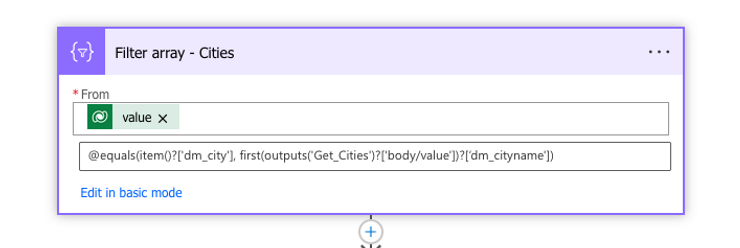
In order to achieve this on another array of Cities only, we can use the approach present in the below image.

Explaining the image we have the following:

  1. Value, in my case is the list of Cities that i have extracted from CRM from a custom entity.

  2. @equals(item()?['dm_city'], first(outputs('Get_Cities')?['body/value'])?['dm_cityname'])
    Where item()?[‘dm_city’] represents the field from the custom City entity The second part of the condition is ‘first(outputs(‘Get_Cities’)?[‘body/value’])?[‘dm_cityname’])’ where ‘dm_cityname’ represents the field from the dataverse query where the accounts were returned.

Hope it helps.

Saturday, 5 February 2022

Microsoft Powerflow - Dynamics 365 - Adding email attachments


 Consider this situation: you are working with Microsoft Dynamics 365 and need to generate an email using an email template, including attaching the email attachments.

It was a little bit tricky to figure out how to do it, the reason of that being the UI itslef induces the developer in error.

See the image below where we will explain what to fill and how to fill the data.

Explaining the fields to fill:

  1. Attachment(Attachments), this is the first trick field, the UI tells you that is a required field, than makes you thinking that you need to set a GUID if you read the content of the text box without any data. However, after trying and trying, i set the value to a null trough the Expression set data type, don´t try as Dynamic.

  2. Entity, this is without any doubts the most weird one, when you try to fill, it only allows to options, ‘Email Template’ and ‘Email Activity’. In this case, we thought we needed the Email Activity because we were creating a Email Attachment to an Email. The error given by the history is the one below:
    The entity with a name = ‘4200’ with namemapping = ‘Logical’ was not found in the MetadataCache….
    After googling and trying, i found the solution to be set the field as email as per printscreen. Has to be set as selecting ‘Enter custom value’, and set as email.

  3. The other fields are more or less explanatory, as per screenshot.

Hope it helps.

Tuesday, 29 September 2020

Using Key Vault reference in arm parameters file template, another scenario

Following the last post, where an example is given on how to use Key Vault in a Arm Parameters File Template.

That's a great idea for using Key Vault when deploying a resource with DevOps. However, that's not the only challenge you have, another question that can be important to ask is. And what about a Service Url that you can be using in a Logic App for example. 

First thing that probably comes to mind is: OK, let's create a parameter like [Service URL], set the value to the right URL needed for the purpose. And do that for all parameters files related to each environment.

Now, assume a disaster recover type of issue, where that [Service URL] is no longer available and instead you are provided a new one to configure in your Logic App. (Assuming the next steps are done only after provided the new URL)

Yes, you go back to your source control, change the relevant value in the parameters file, check in the code, most likely, promote the change, and finally with continuos integration it gets deployed to the specific environment. Now, I will ask you, how much time took you to perform that change, from the moment it got to you, until it was deployed? If your team has the coding and deployment well oiled, probably 1h, but as we know, not all companies have that so well implemented. What it means that it can take quite some time. 

Depending on how the availability affects the "Customer", most likely someone will be asked questions why it took so long a small change to point to a new URL?

There's where the Key Vault in here can have an important paper. Why not use the Key Vault for this purpose? Probably another interesting idea for using the Key Vault, don't you think? Instead of setting the URL for every environment "hard coded" in the parameters files, just create a Key in the Key Vault for that purpose and reference it.

For this specific scenario, and works really well. Assuming the same disaster scenario. The only thing needed would be ask someone to create a revision on the secret, set the value and that's it. How much time needed? Probably 2 minutes.

Any comments/questions are welcome.

Hope it helps.

Thursday, 24 September 2020

Azure Key Vault - Using in arm template parameter files

Let's start from the beginning, Microsoft says:

"Azure Key Vault is a tool for securely storing and accessing secrets. A secret is anything that you want to tightly control access to, such as API keys, passwords, or certificates. A vault is a logical group of secrets."

A colleague of mine told me about using a key vault reference in an arm template parameters file, the idea would be for accessing data like a password of a user for an SQL Server connection. 

The idea was brilliant, first, no passwords referenced in any file, second, deploying to a new environment, only thing that we need to change is the Resurce Group name, and Artifact name (Key Vault Name) from the ID of the resource.

That part it is easy if you work with some standard naming convention, for Azure purpose, and mentioned already in my previous post. Link: https://dynamicsmonster.wordpress.com/2020/09/22/configuring-arm-templates-deploying-to-different-environments/

As an example please see below JSON parameter, this is an example from a parameter file.

"sql_1_password": {
"reference": {
"keyVault": {
"id": "/subscriptions/[Dubscription Id]/resourceGroups/[Resource Group]/providers/Microsoft.KeyVault/vaults/[Key Vault Name]"
},
"secretName": "[Sql Password]"
}

So, you would have one parameter file per environment, the only thing you would need to change from example above is [Resoure Group] and [Key Vault Name], keeping the same secret name in the other key vaults in the other resource groups will work with no problems at all.

In next post will tell another scenario where using Key Vault in arm parameters files is useful.

Anything please comment here or contact us.

Hope it helps.

Follow us.

Thank you.

Tuesday, 22 September 2020

Configuring Arm Templates (Deploying to different environments)

When developing around Azure, more specifically with Azure Logic Apps, Azure Functions, Azure API Management, and with almost no experience or none experience at all a good starting point it is using the browser.

This allows us to start doing our tasks, practising, testing and then deploying to a different environment.

I read many articles with different views of how to achieve this. Usually in any IT Company when we are developing we all need to use a source control tool, in this case it only applies to Microsoft Devops, and for some artifacts I think we need to be using Premium account.

I started the same way, I went to Azure Portal and created few Logic Apps to become proficient with the technology. Not to getting in here with a long story, I will cut things short now and if you need anything, comment in here or contact us.

Using Visual Studio and installing Azure extensions allowed me to start using my Visual Studio in conjunction with my TFS Online (Git in my case).

The reason of this post is more to have in mind a way to automate(not the focus of this post, but helps in terms of configuration) the deployment of the Resources to Azure.

Assumptions here:

  • Use Visual Studio
  • A resource group in Azure means an "Environment" 
  • Full automation of Deployment trough Azure Dev Ops

High level steps below:

  1. Created a Visual Studio 'Azure Resource Group' and used a Logic App template
    1. Created 2 files
      1. LogicApp.json
      2. LogicApp.parameters.json
    2. I changed the naming convention of the parameters file and created another file
      1. LogicApp.parameters.dev.json
      2. LogicApp.parameters.uat.json
    3. Opened the LogicApp.json design mode
      1. Configured with recurrence trigger
      2. Added an artifact 'Initialize variable' and set value to 'Hello World'
    4. Opened the LogicApp.json as json file and configured the following:
    5. Inside the parameters node:
      1. "Environment": { "type": "string", "defaultValue": "Dev" }
      2. "LogicAppName": { "type": "string", "defaultValue": "[concat('MyLogicAPp-', parameters('Environment'))]" }
    6. In the LogicApp.parameters.dev.json inside the parameters node:
      1. "Environment": { "type": "string", "value": "Dev" }
    7. In the LogicApp.parameters.uat.json inside the parameters node:
      1. "Environment": { "type": "string", "value": "Uat" }

This is a personal option of deploying to different environments, but as i saw there are many ways of doing the same. Hope it is clear.

The result in terms of naming convention would be something like:

  1. Azure Resource Groups
    1. Dev
      1. Logic Apps
        1. MyLogicApp-Dev
    2. Uat
      1. Logic Apps
        1. MyLogicApp-Uat

Why this option? Because if you use Azure Dev Ops, you know for instance that navigating for example to Logic Apps area:

Without doing this naming convention the result would be something like.

NameResource Group
MyLogicAppDev
MyLogicAppUat

Doing this naming convention the result would be something like.

NameResource Group
MyLogicApp-DevDev
MyLogicApp-UatUat

If you have one or two logic apps that's probably fine doing without appending the environment to the name, but honestly I found that working in larger projects using Azure this is actually beneficial.

Any additional information or help please don't hesitate in contacting us.

Monday, 14 September 2020

CRM Transaction Mode operations (Dynamics 365 V9)

I hope I'm not late with this post. Who never had to do develop some code where the requirement would be "In Transaction"?

I don't think this will apply to all possible scenarios but it is a start.

Let's assume the following scenario: In CRM 365, someone asked you to apply a change to an entity based on a really easy filter. For example, if a customer address is in City "A", set a custom field with value "B", however, if you can't update one of the records for some reason (example, exception thrown), you need to rollback everything.

Here, and we all know that are many ways to achieve this, I'm giving one.

Hypothetically, let's assume we opt for a plugin at first sight, however, after some testing we start to get Timeouts because we need to update to many records and the 2 minutes just pass.

Another option would be with a Console Application, and this is a personal option, not 100% right nor 100% wrong, there is one of many ways. 

By not doing with a Plugin, brings me to a problem that needs to be addressed based on the requirements that is the requirement "Transaction". If one of the records fail, I need to undo the others, so, more code to deal with that, however, you can avoid that for this specific case only with CRM SDK, no need to reinvent the wheel.

Found in the SDK the message ExecuteTransactionRequest that do the Transaction I really needed, this allows me to perform multiple requests as one single database transaction. Using this message allows executing two or more organization services requests in a single database transaction. If one of the requests fails the transaction is rolled back.

For more information visit Microsoft page below:

https://docs.microsoft.com/en-us/powerapps/developer/common-data-service/org-service/use-executetransaction

Any questions please reply trough this post or contact us.

Hope it helps.

Wednesday, 19 August 2020

Azure API Management Policies

 This post is about a scenario I had to overcome when connecting to a third party API trough Azure API Management.

Below I just have a small explanation on what are Policies in Azure API Management. that i just copied and pasted from Microsoft.

After will tell the issue and the solution i had to implement.

Transcript from Microsoft "https://docs.microsoft.com/en-us/azure/api-management/api-management-policies":

"Policies are a powerful capability of the system that allow the publisher to change the behavior of the API through configuration. Policies are a collection of Statements that are executed sequentially on the request or response of an API. Popular Statements include format conversion from XML to JSON and call rate limiting to restrict the amount of incoming calls from a developer. Many more policies are available out of the box.

Policy expressions can be used as attribute values or text values in any of the API Management policies, unless the policy specifies otherwise. Some policies such as the Control flow and Set variable policies are based on policy expressions. For more information, see Advanced policies and Policy expressions."

Scenario

I have 2 API's in my API Management service, one I called AUTH, the other, Services. From the Auth I just get a Token then after I will need to pass in all methods inside the Services API.

Another thing that worth to mention is, all needs to be deployed with Azure Devops Release Pipelines, don't want actually anything that needs to be deployed manually. 

Problem

Because of some import restrictions of importing API definitions to Azure API Management from a Swagger file, when importing the Swagger file, the required headers, that were defined in the file were not configured in the API.

Solution

I had to add a policy to check if a header was being passed from in my case a Logic App inside the API Management Service, but had to apply to all API's inside, so I could automate the deployment as said in the scenario. 

With this, I only had to use 2 artifacts on the release in DEV Ops, the first to create the API Management, and the other one to import an API from a swagger file to the API Management service created with the first artifact.

The condition inside the policy is important in here because as I said, I have 2 API's inside my API Management Service, however, i only want the policy to be applied in one of the cases. 


Hope it helps.

Wednesday, 21 August 2019

CRM 365 On Prem - Import CRM 2016 Organization

For the last days working on testing new features of CRM 365 Online, CRM 2016/365 On Prem and few more things.

And again, i had another issue, this one is really annoying, but let me explain what happened.

I have an environment in CRM 2016 with service pack 1.1 (8.1.1.1005) and we need to upgrade to V9 (365 Onprem). 

So, what i did? Backup of the database, restore of the database in the new V9 environment and imported the organization, expecting that the process would run smoothly, WRONG, it didn't, and that i should already expect based on my experience.

The error i got was: "09:24:11|Verbose| Error occured in UpdateRollupFieldStoredProceduresInternal: Microsoft.Crm.Metadata.MetadataAttributeMetadataNotFoundException: 'Attribute' metadata entity doesn't contain metadata attribute with Name = 'autonumberformat'."

I googled it, and nothing. So, in these cases what should we do? And again based on my experience, let's try to import into at least a same environment major version, in this case CRM 2016 (8.1) or CRM 2016 (8.2).

I imported into a VM with the same version of rollup and it worked. Next deleted the database, upgraded to version (8.2.2.0112), restored again the one from V8.1and imported the organization again. Voila, it worked. 


After doing this, imported this org into the V9 environment and it worked. Perfect, i could be happy, but not completely, needed more testing.


Again, deleted the database, upgradeed to version (8.2.9.19), last update in version 8.2, restored again the one from V8.1 and imported the organization again. And guess what, expecting to work, of course it didn't, was expecting a field from the systemuser table.


What can we learn from here, at least Microsoft is consistent, the same happened in CRM 2011, if not mistaken, we couldn't install update rollup 15, without 14, however, having the update rollup 14, we could go to update 21. What this means is, update rollup 14 was a major update release in the product, what it seams happening in here as well.

Hope it helps.

Saturday, 17 August 2019

CRM 365 - Unified Interface - do not see Run Workflows On Demand in forms or views

 Ok, again one more time Microsoft strikes again with the new release, in this case Unified Interface.

I just enabled the Unified Interface in one of the CRM Organizations I am working in (Sandbox) and saw a couple of strange things happening. Being System Administrator and not being able to create new records or even updating records i am the owner (entity account), already sorted, please see my previous post.

So, at the moment i am just uploading the new versions of my Plugins/Workflows with the latest nuget pakages from Microsoft. What was my surprise when just added a process to Run On Demand, and couldn't see the "Process - Run Process" on the form and grid.

What i did next, set to run on Create, created a record, and saw that was still working as expected. After some investigation, i have found that as an extra, we have to enable few things in the Platform Admin Center, and we need to be sure that we have as well the Microsoft Flow license is enabled.

What the hell??!!? The product is not supposed to work as before? At least functionality that was even not said by Microsoft that would be deprecated?

The steps to follow are below:

1. Check if Licence is enabled

Open https://portal.office.com/adminportal#/users and select the user
Click vertical … (skinny burger menu?) and select Manage product licenses
Expand Apps and make sure Flow for Dynamics 365 is selected

2. Enable Microsoft Flow

Enable setting to show Microsoft Flow on the forms and in the sitemap
Open Power platform admin center (https://aka.ms/ppac)
Select Environments
Click … (horizontal one, ugh), select Settings
Select Behavior
Make sure Show Microsoft Flow on forms and in the site map is selected


Hope it helps.

Tuesday, 4 December 2018

CRM Dynamics 365 V9.0 - Web API improvements

 The following improvements are included in this release of the Web API, our OData v4 endpoint:

  • Custom actions that return EntityReferenceEntity, or EntityCollection types are available.

  • Changes to API behaviors are available using the latest v9.0 version of the service, legacy behaviors remain available in the v8.x version. You don’t have to change your code when you upgrade.

  • New messages: GrantAccessModifyAccess, and RetrieveSharedPrincipalsAndAccess messages are now available using the Web API.

  • We have made the amount of service metadata smaller by not including annotations by default. If you need the annotations, you can use parameters to have it included.

Hope it helps.

Source: Microsoft

Wednesday, 7 November 2018

Issues connecting to CRM 365 from IIS only

Everything working with no issues with the latest Nuget Packages for CRM through a console application when connecting to CRM 365.

Now, we had to promote a service that is currently working and has been working already for long time to consume CRM 365 data to work with the new CRM ddls.

We added the dlls trough nuget packages, everything compiling but when this next line was called:

OrganizationServiceProxy serviceProvider = new OrganizationServiceProxy(config.OrganizationUri,
               config.HomeRealmUri, config.Credentials, config.DeviceCredentials);


We were having this next exception:

Metadata contains a reference that cannot be resolved: 'https://crm.domain/XRMServices/2011/Organization.svc?wsdl&sdkversion=9.0'.


After some research we found that the solution would be before calling this line, call first:

ServicePointManager.SecurityProtocol = SecurityProtocolType.Tls12;


I will investigate more when i have some spare time.

Hope it helps.

CRM 365 Cloud - Disassociate 2 records using typescript

In case you need to Disassociate 2 records, please find below the code that allows you to do that.      export async function DissociateE...