Showing posts with label CRM 365 Online. Show all posts

Wednesday, 27 November 2024

CRM 365 Cloud - Disassociate 2 records using typescript

In case you need to Disassociate 2 records, please find below the code that allows you to do that.     


export async function DissociateEntities(primaryEntityType: string, primaryEntityTypeId: string, secondaryEntityName: string, secondaryEntityId: string, relationshipName: string) {


        debugger;

        var Sdk = window.Sdk || {};


        Sdk.DisassociateRequest = function (target: string, relatedEntityId: string, relationship: string) {

            this.target = target;

            this.relatedEntityId = relatedEntityId;

            this.relationship = relationship;

        };


        // NOTE: The getMetadata property should be attached to the function prototype instead of the

        // function object itself.

        Sdk.DisassociateRequest.prototype.getMetadata = function () {

            return {

                boundParameter: null,

                parameterTypes: {},

                operationType: 2, // Associate and Disassociate fall under the CRUD umbrella

                operationName: "Disassociate"

            }

        };


        // Construct the target EntityReference object

        var target = {

            entityType: primaryEntityType,

            id: primaryEntityTypeId

        };


        // The GUID of the related entity record to disassociate.

        var relatedEntityId = secondaryEntityId;


        // The name of the existing relationship to disassociate from.

        var relationship = relationshipName;


        var manyToManyDisassociateRequest = new Sdk.DisassociateRequest(target, relatedEntityId, relationship)


        await Xrm.WebApi.online.execute(manyToManyDisassociateRequest).then(

            function success(result) {

                console.log("Disassiciate Success!");

                // perform operations on record deletion

            },

            function (error) {

                console.log("Error Disassociating Entities " + error.message);

                console.log(error.message);

                // handle error conditions

            }

        );

    }

}


Hope it helps


CRM 365 Online - TypeScript - Execute Workflow


Please find a snippet code below for executing a workflow from TypeScript.

The only requirement here is to set the WorkflowId and the Id of the record plus the errorMessage and successMessage to use.

Xrm.Utility.showProgressIndicator("Creating .......");


let request =

{

    entity: { id: workflowID, entityType: "workflow" },

    EntityId: { guid: Id },

    getMetadata: function () {

        return {

            boundParameter: "entity",

            operationType: 0,

            //operation name is always “Execute Workflow” independent of workflow name

            operationName: "ExecuteWorkflow", parameterTypes: {

                "entity": {

                    "typeName": "mscrm.workflow",

                    "structuralProperty": 5

                },

                "EntityId": {

                    "typeName": "Edm.Guid",

                    "structuralProperty": 1

                }

            }

        }

    }

};


Xrm.WebApi.online.execute(request).then(

    function (result: any) {

        //alert("The confirmation email will be generated.");

        debugger;


        Xrm.Utility.closeProgressIndicator();


        let alertStrings = { confirmButtonLabel: "Close", text: successMessage, title: "Success" };

        let alertOptions = { height: 200, width: 400 };

        Xrm.Navigation.openAlertDialog(alertStrings, alertOptions).then(

            function (success) {

                console.log("Alert dialog closed");

            },

            function (error) {

                console.log(error.message);

            }

        );

    },

    function (error: any) {


        debugger;


        Xrm.Utility.closeProgressIndicator();


        let alertStrings = { confirmButtonLabel: "Close", text: errorMessage, title: "Error" };

        let alertOptions = { height: 200, width: 400 };

        Xrm.Navigation.openAlertDialog(alertStrings, alertOptions).then(

            function (success) {

                console.log("Alert dialog closed");

            },

            function (error) {

                console.log(error.message);

            }

        );


    });


Hope it helps.

Wednesday, 20 November 2024

CRM 365 Cloud - Open Form in new window or the same window with Typescript

Please find below the code for opening a form in Typescript.


 export function OpenForm(entityName: string, entityId : string, openInNewWindow : boolean) {


     let entityFormOptions = {

         entityName: entityName,

         entityId: entityId,

         openInNewWindow: openInNewWindow

     };

     // Open the form.

     Xrm.Navigation.openForm(entityFormOptions).then(

         function (success) {

             console.log(success);

         },

         function (error) {

             console.log(error);

         });


 }


Hope it helps.

Saturday, 23 March 2024

CRM 365 - Customer field only show Accounts

On a customer field, if the requirement is to only show Accounts, please add this line to the OnLoad of the form:

//Show only Account records when selecting the Customer    
formContext.getControl("customerid").setEntityTypes(["account"]);

Hope it helps

Friday, 25 February 2022

Microsoft Powerflow - Dynamics 365 - Get Email Template by Title

Let’s assume that you create a Cloud Flow that you will interact with for example trough a button in the account form ribbon.

When i started to work with Flows was already a couple of years ago, before i was using the Premium artifact for Dynamics 365, now we use the Dataverse artifact to interact with Dynamics 365.

For developers used to Web Api, and Odata, the queries that are needed in the Power Flow are kind of similar with the query string for interacting with CRM.

The example i want to show in this post is how to get an Email Template by Name with Dataverse in the flow. 

Please see below image regarding this example:

In my case my Email Template title is ‘[Account] - Send Gift to Customers’, to do that, we just set the Filter rows text as (title eq ‘[Account] - Send Gift to Customers’).

Assuming that you require only a couple of fields to be returned you can add them separeted by (,) in the ‘Select columns’ field.

Assuming that you need to use the ‘Email Template Id’ field returned by the call, there are a couple of ways of doing, for instance, you can add the artifact ‘Parse JSON’ where you add the body of the return and for the payload, you can copy and paste from the result of this item and collate after clicking on “Generate from Sample”.

Actually when working with Logic Apps and Power Flow you start to understand how things work and get used with small tricks to avoid adding unnecessary artifacts when you need only one or two properties.

In here, because i needed only the Email Template Id returned, and i knew it would be only returned 1 row, whenever you need to use it do the following:

  1. Start to select the ‘Expression’ and write first()

  2. Position the cursor inside of the brackets, and click on ‘Dynamic COntent’

  3. From the right artifact, select the property needed, in my case ‘Email Template Id’ and click ‘Update’

The result if you use the ‘Peek Code’ by clicking on the 3 dots from the artifact (in my case, the one on the screenshot above) will be something like:

first(outputs(‘Get_Email_Template_where_title_=’‘[Account]-_Account_send_gift_to_customers’’’)?[‘body/value’])?[‘templateid’]

So, i didn’t need to use the artifact for Parse the Json result returned from the call to after use the property templateid.

Hope it helps.

Wednesday, 9 February 2022

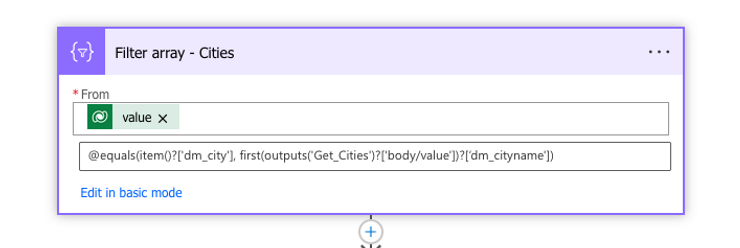
Microsoft Powerflow - Filter Json Array

 Recently I had to filter a Json Array of objects in Powerflow.

Let’s say we have a list of accounts and we need to filter by city name. In My case I was getting the data trough Dataverse.

In order to achieve this on another array of Cities only, we can use the approach present in the below image.

Explaining the image we have the following:

  1. Value, in my case is the list of Cities that i have extracted from CRM from a custom entity.

  2. @equals(item()?['dm_city'], first(outputs('Get_Cities')?['body/value'])?['dm_cityname'])
    Where item()?[‘dm_city’] represents the field from the custom City entity The second part of the condition is ‘first(outputs(‘Get_Cities’)?[‘body/value’])?[‘dm_cityname’])’ where ‘dm_cityname’ represents the field from the dataverse query where the accounts were returned.

Hope it helps.

Saturday, 5 February 2022

Microsoft Powerflow - Dynamics 365 - Adding email attachments


 Consider this situation: you are working with Microsoft Dynamics 365 and need to generate an email using an email template, including attaching the email attachments.

It was a little bit tricky to figure out how to do it, the reason of that being the UI itslef induces the developer in error.

See the image below where we will explain what to fill and how to fill the data.

Explaining the fields to fill:

  1. Attachment(Attachments), this is the first trick field, the UI tells you that is a required field, than makes you thinking that you need to set a GUID if you read the content of the text box without any data. However, after trying and trying, i set the value to a null trough the Expression set data type, don´t try as Dynamic.

  2. Entity, this is without any doubts the most weird one, when you try to fill, it only allows to options, ‘Email Template’ and ‘Email Activity’. In this case, we thought we needed the Email Activity because we were creating a Email Attachment to an Email. The error given by the history is the one below:
    The entity with a name = ‘4200’ with namemapping = ‘Logical’ was not found in the MetadataCache….
    After googling and trying, i found the solution to be set the field as email as per printscreen. Has to be set as selecting ‘Enter custom value’, and set as email.

  3. The other fields are more or less explanatory, as per screenshot.

Hope it helps.

Wednesday, 21 August 2019

CRM 365 On Prem - Import CRM 2016 Organization

For the last days working on testing new features of CRM 365 Online, CRM 2016/365 On Prem and few more things.

And again, i had another issue, this one is really annoying, but let me explain what happened.

I have an environment in CRM 2016 with service pack 1.1 (8.1.1.1005) and we need to upgrade to V9 (365 Onprem). 

So, what i did? Backup of the database, restore of the database in the new V9 environment and imported the organization, expecting that the process would run smoothly, WRONG, it didn't, and that i should already expect based on my experience.

The error i got was: "09:24:11|Verbose| Error occured in UpdateRollupFieldStoredProceduresInternal: Microsoft.Crm.Metadata.MetadataAttributeMetadataNotFoundException: 'Attribute' metadata entity doesn't contain metadata attribute with Name = 'autonumberformat'."

I googled it, and nothing. So, in these cases what should we do? And again based on my experience, let's try to import into at least a same environment major version, in this case CRM 2016 (8.1) or CRM 2016 (8.2).

I imported into a VM with the same version of rollup and it worked. Next deleted the database, upgraded to version (8.2.2.0112), restored again the one from V8.1and imported the organization again. Voila, it worked. 


After doing this, imported this org into the V9 environment and it worked. Perfect, i could be happy, but not completely, needed more testing.


Again, deleted the database, upgradeed to version (8.2.9.19), last update in version 8.2, restored again the one from V8.1 and imported the organization again. And guess what, expecting to work, of course it didn't, was expecting a field from the systemuser table.


What can we learn from here, at least Microsoft is consistent, the same happened in CRM 2011, if not mistaken, we couldn't install update rollup 15, without 14, however, having the update rollup 14, we could go to update 21. What this means is, update rollup 14 was a major update release in the product, what it seams happening in here as well.

Hope it helps.

CRM 365 Cloud - Disassociate 2 records using typescript

In case you need to Disassociate 2 records, please find below the code that allows you to do that.      export async function DissociateE...